Content engineering
How I use AI for work I already know how to do
From founder posts to reusable skills, products, and launch videos: the process, the files, and the work behind them.
In this guide · 13 sections
At Flexiple, I had three recurring jobs: writing posts for the founders, writing video scripts, and writing job listings. The subjects changed. A lot of the decisions didn't.
I knew how a founder liked to open a post. I knew when a script was spending too long explaining the background. Job listings had a structure I could almost fill out without thinking.
I first tried teaching chats to do those jobs. Then the chats became a problem of their own: downtime, locked conversations, memory filling up. I wrote about that stage in Being busy.
I started learning APIs and Python, and built small tools around the tasks. The inputs were still messy. A founder's rough thought doesn't become a brief just because you've put a text box around it.
What helped was knowing the work well enough to spot a bad output. I could point to the missing context, the unnecessary explanation, or the line the founder would never say. Those edits became instructions I could use again.
This is what I mean by content engineering: taking work I understand, writing down the repeatable parts, and building a workflow around them.
Learn the editorial decisionsDo the work before you build the workflow
When I say “do it by hand,” I mean learn the decisions inside the task. Writing a post teaches you where the idea is missing. Editing a script teaches you which explanation the viewer no longer needs.
That gives you something to put into instructions. “Make this engaging” is hard to evaluate. “Open on the decision, explain the constraint, and end on what changed” gives both you and the model a sequence to work with.
- 01Do it
Write or edit the piece yourself.
- 02Explain it
Name the choices that improved it.
- 03Encode it
Add instructions and examples.
- 04Try it again
Use a new brief and inspect the result.
Your edits feed the next version of the instructions. The process keeps learning from the work.
You don't have to become the best writer in the world before using AI. You do need a way to judge the result. Start with a task where you can point to the line that went wrong and explain the edit.
Start with a real assignment
“Write better posts” is too big a problem to work on. A founder has an idea, an audience, a way of speaking, and a reason for publishing. Start there.
When I worked on Karthik's accounts, I studied posts from similar profiles. I paid attention to the sequence: how much context came first, where the surprise arrived, and whether the last line needed explaining.
Here's the prompt format I showed in the original session. The slots matter: I supplied a reference and my own idea, then asked the model to study the reference's structure without borrowing its content.
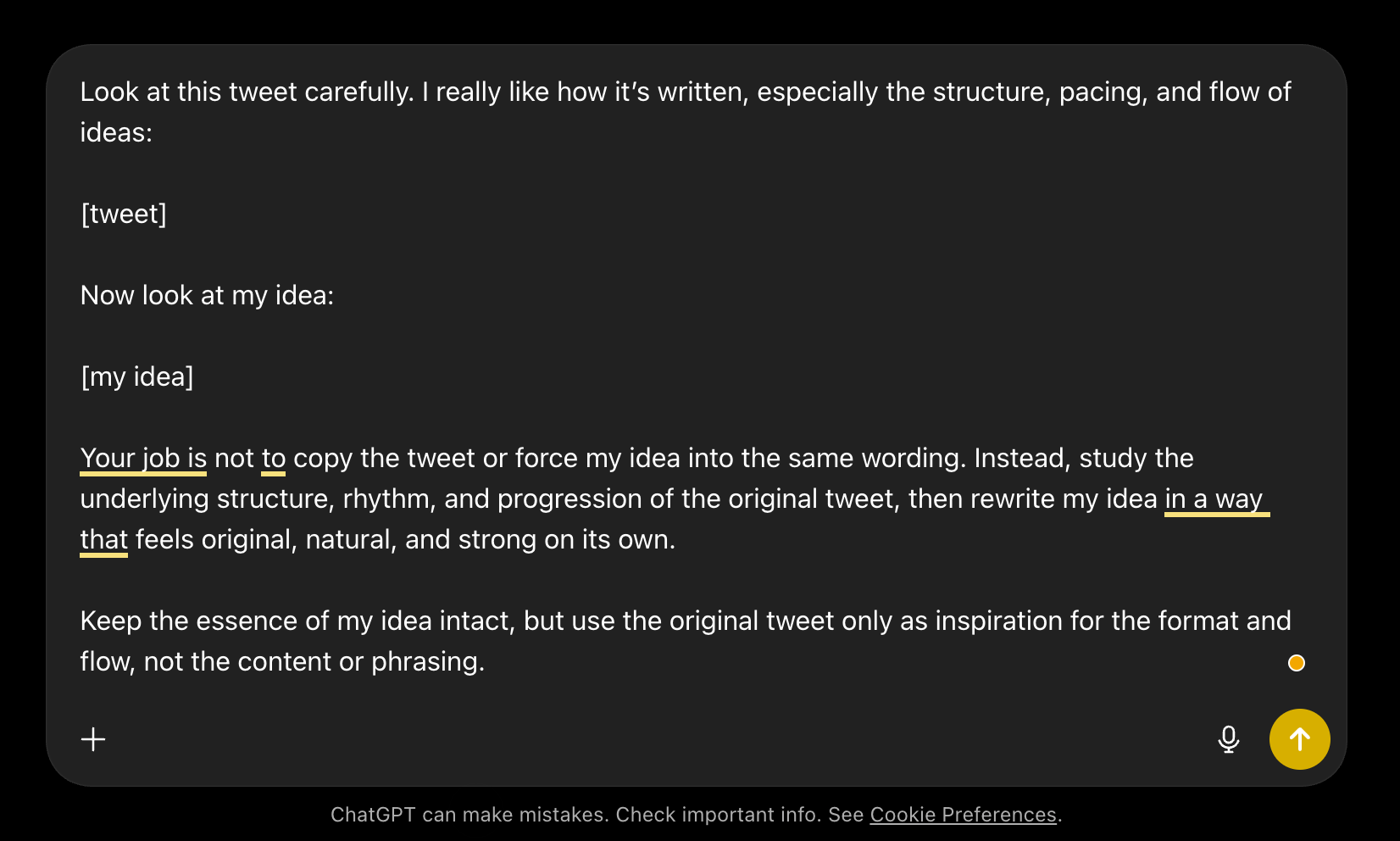
Workshop artifact, May 2026. The screenshot shows the prompt template; the reference and idea were filled in for each assignment.
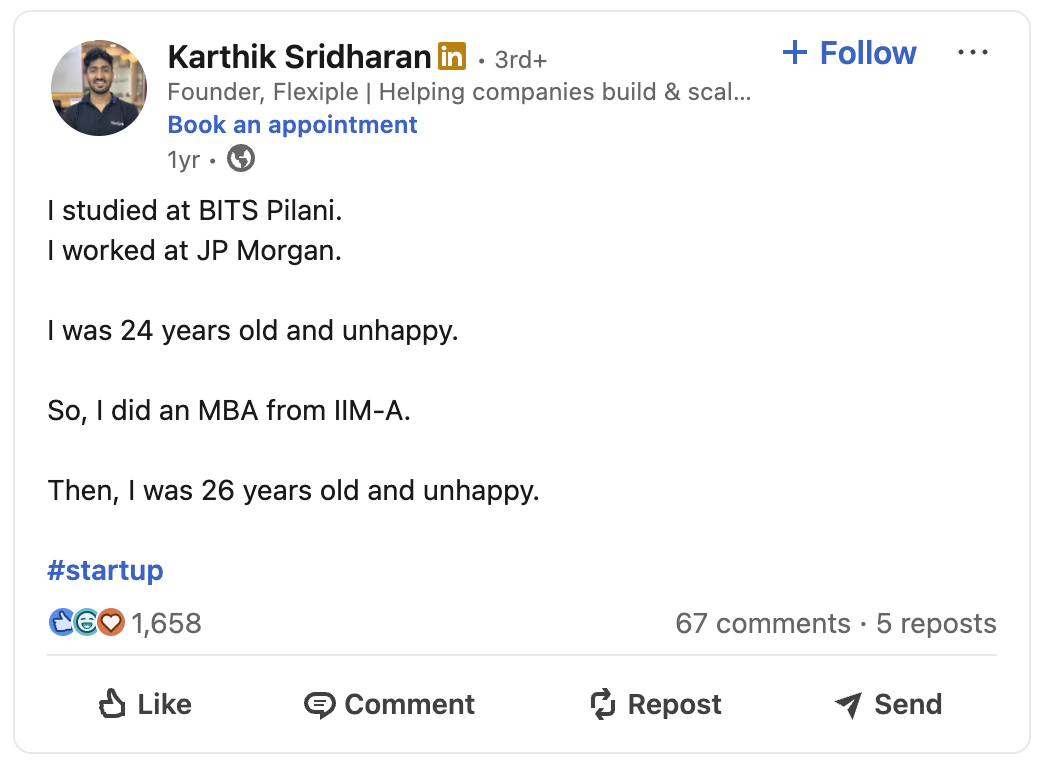
Take this published post:
- 01 · Establish the expected path
BITS Pilani and JP Morgan do the setup quickly. These are recognisable signs of doing well; the post doesn’t need a paragraph explaining them.
- 02 · Offer the next sensible step
“So, I did an MBA from IIM-A.” The word “so” makes the MBA sound like the answer to being unhappy.
- 03 · Repeat the outcome
“Then, I was 26 years old and unhappy.” The age changes. The feeling doesn’t. Repeating the wording lets the reader make that comparison immediately.
What I’d carry into another brief: set up an expectation, show the attempted fix, then let the repeated outcome end the story. Adding a lesson below the last line would explain what the reader already understood.
This is the kind of thing I want the model to notice. The post needs very little explanation because the order and the repeated words make the point.
That's a useful observation to carry into another brief. Copying the career history would be nonsense. Copying the wording would miss the point, too.
Here's another post from the same work:
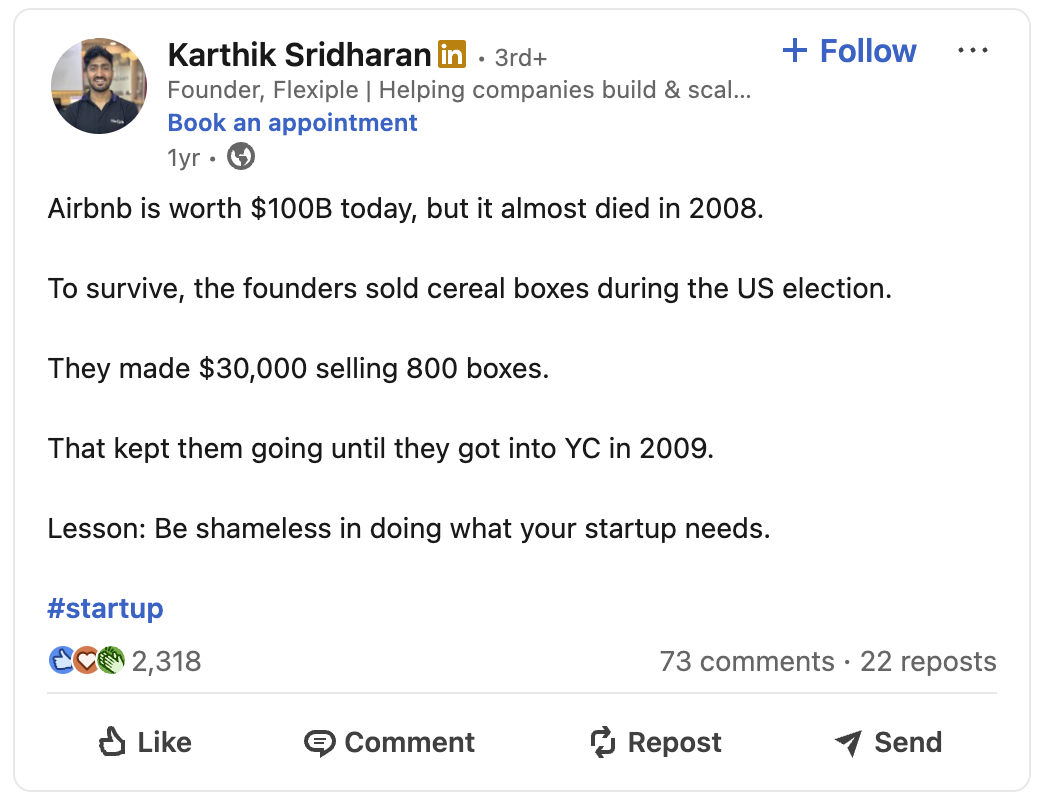
This one moves differently. It starts with a familiar company, introduces a threat to its survival, shows the founders' unusual response, then lands the lesson. The first post relies on repetition; this one relies on a sequence of events.
Both are published work from my reference set. The Airbnb valuation is historical; recheck it before reusing that opening.
That difference is why I don't want a folder containing only one kind of successful post. The model needs to see when a structure is useful, and when it would force the idea into the wrong shape.
Explain the choices inside your references
I used to ask ChatGPT to study a post's structure, pacing, and progression, then apply what it found to a new idea. That was more useful than asking for something “engaging,” but it still left a lot open to interpretation.
A reference becomes more useful when I explain the choice I want repeated. Here's the annotation I'd save for Karthik's MBA post:
Use the repeated outcome to create the turn. Keep the setup short enough that the reader remembers it. End when the pattern becomes clear. Don't add a lesson underneath it.
Annotation written for this guide; the original prompt template is shown above.
I'd also include a version I rejected and explain why. “Too generic” tells the model very little. “This last paragraph explains what the previous line already showed” gives it an edit to make.
A useful reference set can stay small:
- Work I would happily put my name on, with notes about why it works.
- A few rejected passages, with the exact problem marked.
- The person's words and phrasing, including things they'd never say.
- Constraints that affect the work: audience, format, length, and claims we can support.
The number of examples depends on the job. I want enough variety to show the range, without stuffing the folder with twenty versions of the same thing.
Build and improve your setupSeparate the standing instructions from today's brief
Some information changes slowly: voice, audience, recurring formats, editorial preferences. Some arrives with each assignment: the topic, source material, point of view, and what this particular piece needs to do.
I keep those apart so I can update a brief without rebuilding the whole setup.
| Keep as a reference | Supply for this assignment |
|---|---|
| Voice and examples | The person's actual idea or notes |
| Recurring editorial choices | Source links and confirmed facts |
| Format requirements | Intended reader and purpose |
| Common errors to check | Anything different about this piece |
If the brief doesn't contain a point of view, I need to find it. I might ask the founder a better question, do more research, or work through my own notes. A confident draft won't make that missing thought appear.
Here's a small brief you can adapt:
The reader:
What they already know:
The one thing this piece should help them see:

Source facts and links:
My observation or the founder's point of view:
Relevant example, and the choice worth learning from it:

Format and constraints:
What the draft must not assume or invent:
Download the brief and review checklist.
Understand what fits in the context window
A context window is the material a model can work with during a request. It includes instructions, conversation history, source material, tool results, and room for the response. A token is a unit of that material, often part of a word.
Capacity is only part of the problem. Imagine one reference says “always end with a question” and your latest edit says “stop when the point is complete.” Both can fit comfortably in the window. The model still has to resolve the contradiction.
There isn't a universal token count at which a model loses focus. The model, task, document structure, and location of the relevant passage all affect how well it uses what you give it.
Anthropic lists a 1M-token window and up to 128k output tokens for Claude Sonnet 5 and Opus 5. Those are API specifications checked on 5 September 2026, not a suggested size for your writing brief. Model documentation.
I would still rather give the model the right source passage than a large pile of loosely related files. Anthropic's context guidance explains how history and tool use consume the window.
Voice, audience, format, and the recurring editorial choices.
These are parts of one request, not token quotas. Leave room for the answer and retrieve additional sources when the task needs them.
Read the assembled request
- Standing instructions
- Use direct language. Preserve the founder’s view. End when the point is complete. Read references/voice.md.
- Relevant reference
- The repeated outcome creates the turn. Keep the setup short enough to remember; don’t explain the joke afterward.
- Today’s brief
- The piece is about learning software setup while building a tweet-writing app. Source: the February 2026 newsletter. Milestone: the first 100 users.
- The next task
- Offer three openings. Explain the promise each makes. Keep the source facts unchanged and flag any missing information.
What I keep, retrieve, and leave out
Keep the voice rules and non-negotiable constraints easy to find. Retrieve the reference that fits this assignment. Bring in the relevant source passage with its link and date. Leave unrelated drafts outside the request.
Retrieval means selecting material when it is needed. A connector gives the assistant access to another place, such as a drive or a database. Access doesn't mean the assistant has read the right file; the result still needs checking.
When a conversation gets tangled, I start a fresh session with a short handoff: the assignment, confirmed facts, chosen angle, decisions already made, and the exact files to consult. I don't carry every discarded draft into it.
That is also what I want from a summary or compaction step. Preserve decisions and source references. Don't let a shortened conversation quietly become the only record of the work.
Build a skill you can actually reuse
A prompt asks for something now. A skill packages a repeatable job so an agent can return to it. The useful distinction is reuse and structure; a carefully written prompt can be reusable too.
The Agent Skills specification requires a folder with a SKILL.md file. References, scripts, and assets are optional. I put the workflow in SKILL.md and keep longer examples in reference files.
Here's a starter folder for the kind of founder-writing work above:
founder-posts/
├── SKILL.md
└── references/
    ├── voice.md
    ├── good-posts.md
    └── edits.md
And here's a usable starting point for the instruction file:
---
name: founder-posts
description: Draft or revise a founder post from supplied notes and sources.
---

1. Read references/voice.md.
2. Identify the idea, reader, and purpose in the brief.
3. Read the relevant example in references/good-posts.md.
   Explain which editorial choice applies to this assignment.
4. If a fact or point of view is missing, flag the gap.
5. Offer three openings, each with the promise it makes.
6. Draft the selected angle using only supported claims.
7. Read references/edits.md and check for recurring mistakes.
8. Return the draft and any facts that still need checking.
The instruction names the files and says when to use them. The examples stay in separate files so I can add to them without burying the workflow itself.
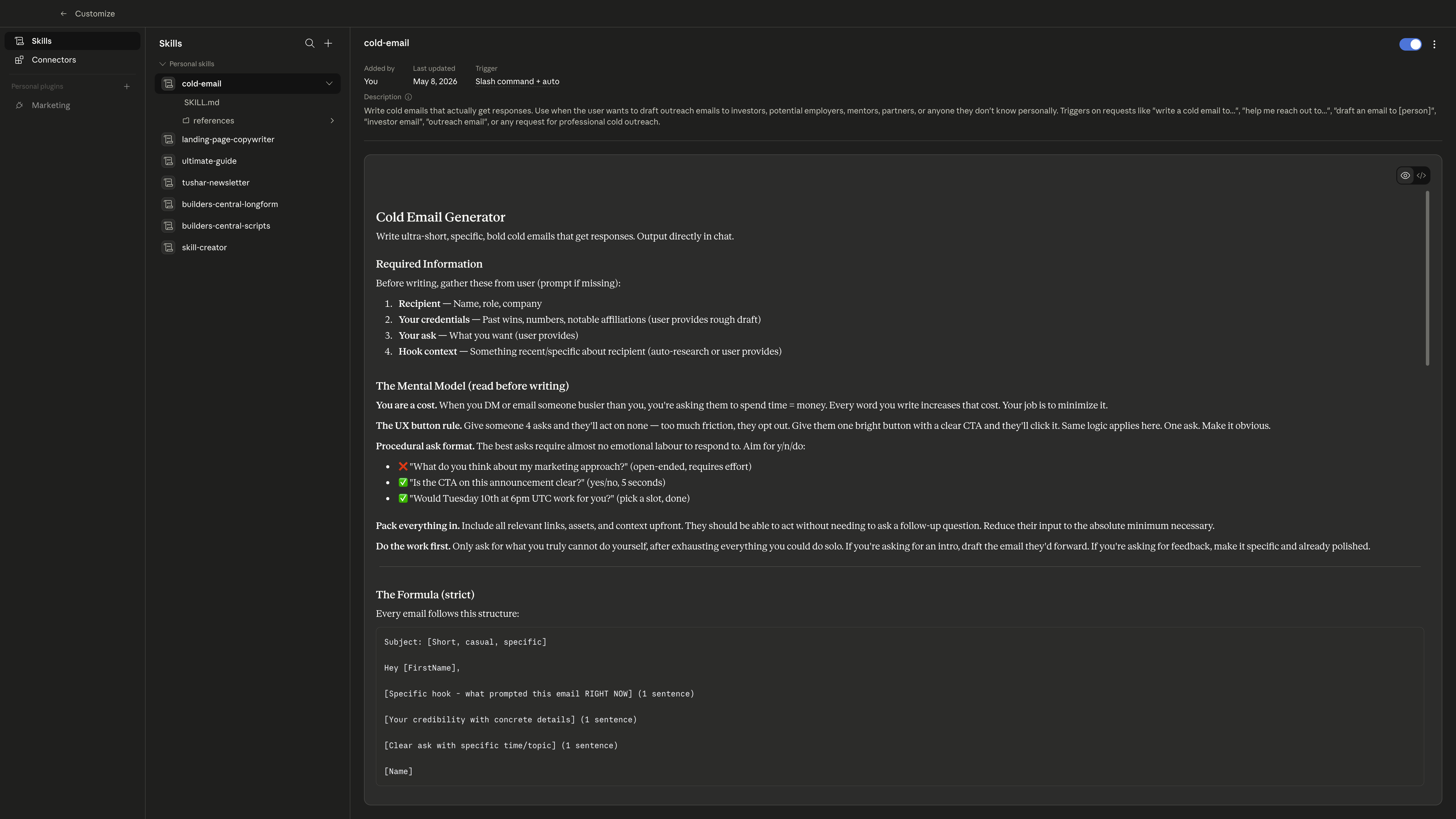
This is the setup I demonstrated, including skills for emails, newsletters, and scripts. Open the image to read the original instructions at full size.
Put the reasoning beside the example
In good-posts.md, I would keep the post and a short annotation. “Good hook” isn't enough. Explain what the first line makes the reader expect and where the post delivers it.
In edits.md, keep the original line, the replacement, and the reason. A growing list of banned words won't teach the model why a paragraph is dull. A specific before-and-after can.
Test the skill on a new brief, not just the example it was built from. Try a factual explainer, a personal observation, and a story with very little source material. See whether it knows when to ask for more.
Download the starter skill files. They contain this instruction file and fill-in reference templates.
Ask for the part you need help with
I don't always need a finished draft. Sometimes I need a few ways into an idea. Sometimes the opening works and the middle is dragging. Asking for the specific part makes the output easier to judge.
For an opening, I'd use something like:
Use the brief and sources below.
Give me three openings from different angles.
Explain what each opening makes the reader expect.
Use only the supplied facts. Flag anything missing.
The explanation is useful because a clever opening can promise the wrong piece. If the sources can't deliver what the opening sets up, I need a different opening.
Once I've chosen an angle, I can ask for a draft. Then I edit against the source and the person whose name will be on it. I pay particular attention to the lines that sound good enough to slip past me.
Make the edit specific
“Make it more human” leaves the model guessing. I want to identify the missing information and give it an edit it can repeat. Here's a practice example using the Flexiple work from the opening.
AI transformed my content workflow, helping me unlock efficiency and focus on what really matters.
Which workflow? What changed? The sentence could belong to almost anyone using AI at work.
At Flexiple, I kept writing three things: founder posts, video scripts, and job listings. Once I could explain the choices I kept making, I started putting them into tools.
The tasks make the claim concrete. The second sentence explains how I moved from doing the work to building around it.
When a draft claims a workflow improved, name the task and show what changed. Keep the reason the change became possible.
The saved instruction can travel to another assignment. A scriptwriter might name the research, outline, and editor handoff. A recruiter might name the brief, shortlist, and screening notes. The task changes; the demand for a concrete explanation stays.
This is also why I keep edits close to the reference material. If I have to make the same correction repeatedly, it's worth adding a note. If it applies only to this assignment, it stays with the brief.
Know when the workflow isn't enough
A familiar format can make an unfamiliar claim feel safe. A draft can sound like the founder while saying something they don't believe. Good references help with those problems; they don't remove them.
Before using a draft, I check:
- Can I trace each factual claim to the supplied material?
- Does the opening promise something the piece actually delivers?
- Is this the person's view, or a plausible view the model filled in?
- What did the draft repeat, flatten, or explain unnecessarily?
- Would I keep these words if I had to read them aloud?
Sometimes the right move is to rewrite a passage myself. Sometimes it's to ask for more information. Neither tells me the whole workflow has failed. It tells me where the work still is.
Diagnose the failure before changing the model
There are three mistakes I keep seeing: trying to automate a task nobody has explained, building software around a process that is still changing, and treating every disappointing draft as a model problem.
The model can be the problem. It can miss an instruction, lose a detail, or struggle with a style even when the brief is good. I want to isolate that before rebuilding everything around it.
| What I see | What I check first | The next experiment |
|---|---|---|
| Fluent but empty | Does the brief contain an actual point of view? | Add the observation the piece is meant to explain. |
| Right facts, wrong voice | Are the references relevant and annotated? | Supply a closer example and name the difference. |
| Repeated factual errors | Can each claim be traced to a source? | Give the relevant passage; ask for a claim-by-claim check. |
| Good opening, wandering body | Does the opening promise the same piece as the outline? | Draft the sequence before polishing sentences. |
| Quality falls after many revisions | Are old instructions or drafts contradicting the current brief? | Restart from a concise handoff. |
| A clear brief still fails | Is this a capability limit or unstable output? | Compare another model on the same briefs. |
When I compare models, I keep the inputs the same and judge the outputs against the same questions. Did it preserve the point? Did it invent anything? How much editing did it need? How long did it take, and what did it cost?
I care about the cost of a usable result. A cheaper draft that needs a complete rewrite may cost more of my time. A bigger model isn't automatically better at every stage, either.
Choose where to use itChoose a chat, a skill, or a product
A document and a chat are enough to begin. A project keeps related instructions and files together. A skill makes a recurring process easier to invoke. A product becomes useful when other people need to run it without assembling the context.
| Use | When it earns its place | What you have to maintain |
|---|---|---|
| Chat + brief | One assignment or an unfamiliar task. | The sources and this draft. |
| Project or saved workspace | Recurring work for the same person or brand. | Current voice rules and reference files. |
| Skill | A stable process used across assignments. | Instructions, examples, and repeatable checks. |
| API or custom tool | Shared inputs, a specific interface, integrations, or repeatable volume. | All of the above, plus software, costs, and failures. |
Don't build a dashboard to avoid deciding what belongs in the brief. But don't dismiss a useful interface as “just a wrapper,” either. Choosing the inputs and showing the right choices can be a substantial part of the product.
Where I have used this
Builders Central: a workflow inside client work
For Builders Central, I worked on ideas, scripts, editor guidance, and strategy. Over the 18 months engagement, Instagram grew from roughly 2–3k to 241k followers and YouTube from 10k to 176k subscribers. The case study explains the work behind those results.
AI became part of the writing process: references supplied a starting point, then I edited the script and worked through how it would become a video. Those channel results came from the team's work across strategy, writing, production, and distribution.
The workflow has to reach the editor. A line about a product needs the correct screen recording. A comparison needs the material being compared. A good script that leaves those decisions unresolved is still an incomplete handoff.
Read the Builders Central case study, or use the scriptwriting guide to work through the choices inside one short video.
Bangers Only: turning the process into a product
With Bangers Only, I took some of the same thinking into a tweet-writing tool. The product gives people a place to put a rough thought and work through how to express it.
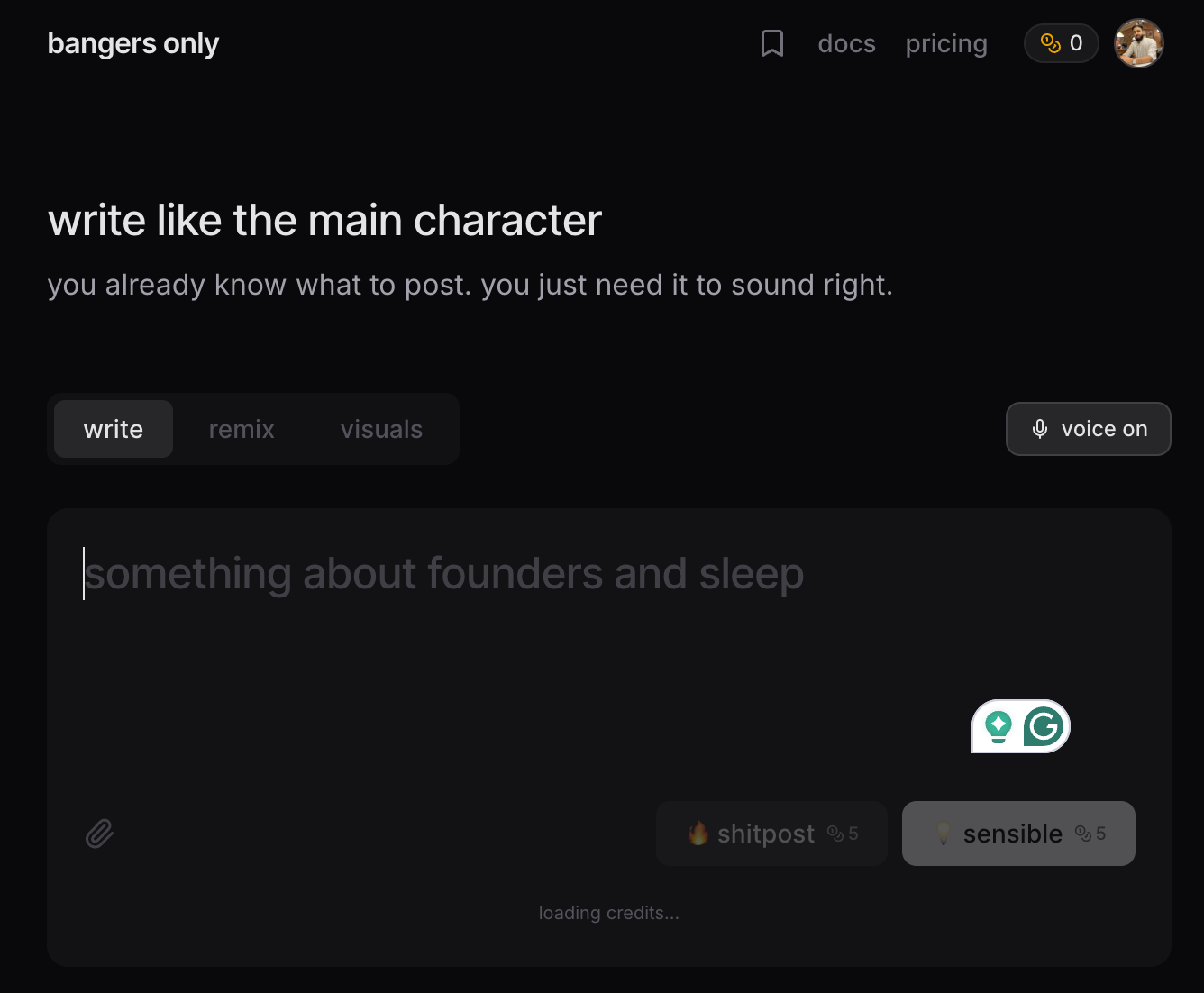
The product interface from the original session. It shows how the writing choices became inputs and controls.
Once someone else uses the tool, the interface has to gather the context I used to supply myself. What do they mean? What is the occasion? How should it sound? What should happen when their input isn't enough?
Those are editorial questions expressed through software. Prompt instructions are one part. The examples, input design, revision loop, and error handling matter too.
Launch videos: the same thinking, in another medium
I used Remotion, Claude Code, and Codex to make a Bangers Only launch video. I described scenes and worked with the generated React code to change the timing, transitions, and what appeared on screen.
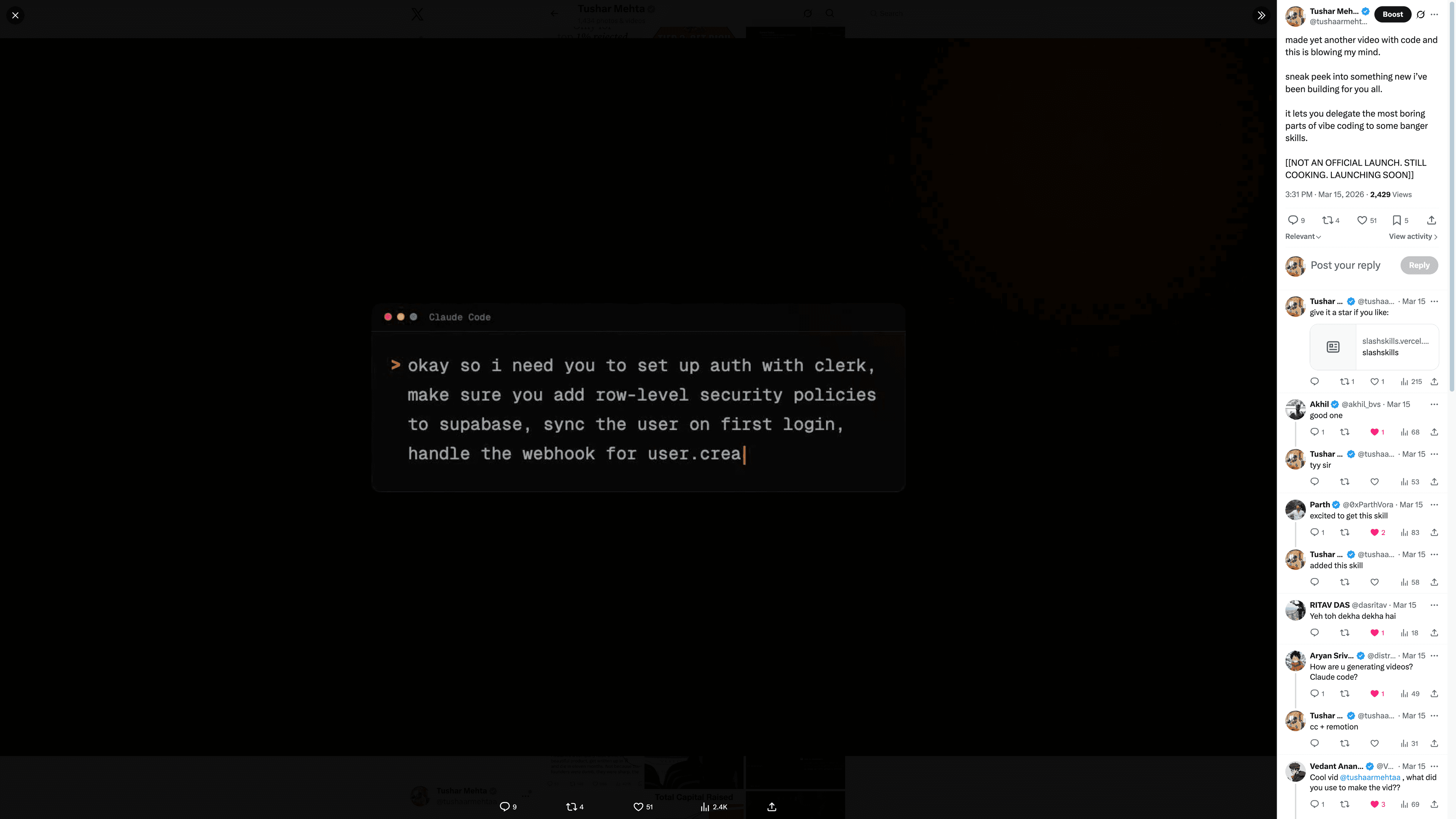
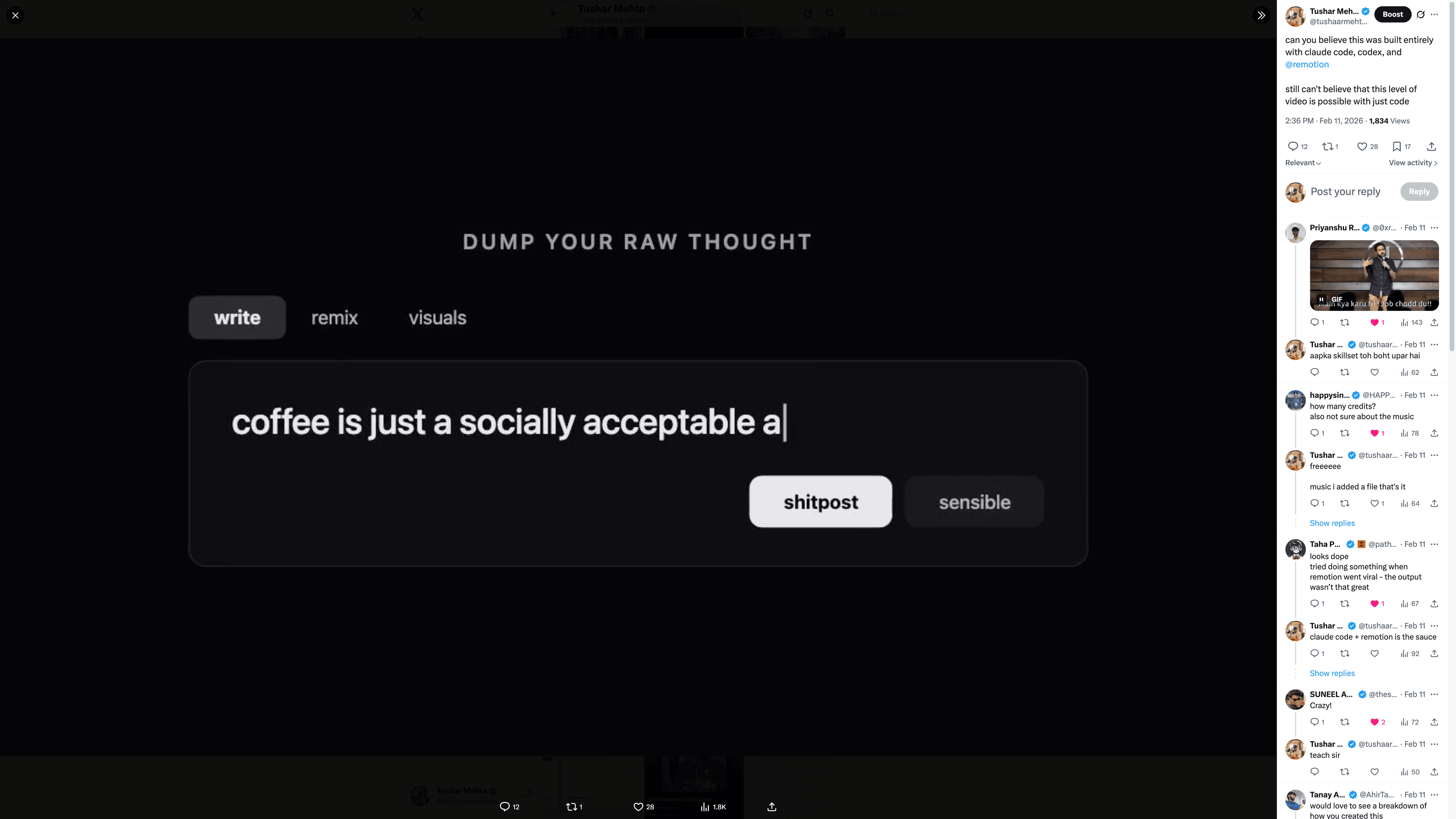
Two examples from the presentation. Select a frame to open the video. The process thread covers the launch-video experiment.
In Remotion, a composition defines the video dimensions, frame rate, and duration. Components determine what is visible at a given frame. That makes a scene's timing something you can change in code. Remotion fundamentals.
A useful scene brief names the spoken line, the image or interface to show, the moment it appears, and what the viewer should notice. “Make it cinematic” leaves almost all of that unresolved.
Scene: reveal the draft
Purpose: show the jump from a rough idea to a usable post
Visual: the real input, then the edited output
Timing: let the viewer read before the next transition
Check: does the output still express the original idea?
I'd draft one scene, render it, watch it, and fix the brief before extending the sequence. The same pattern holds: make a small piece, judge the result, and turn the useful correction into something repeatable.
Slash Skills: keeping the working methods together
Slash Skills collects reusable agent skills. The examples from my session included cold email, tweets, newsletters, and scriptwriting: different jobs that benefit from explicit instructions and references.
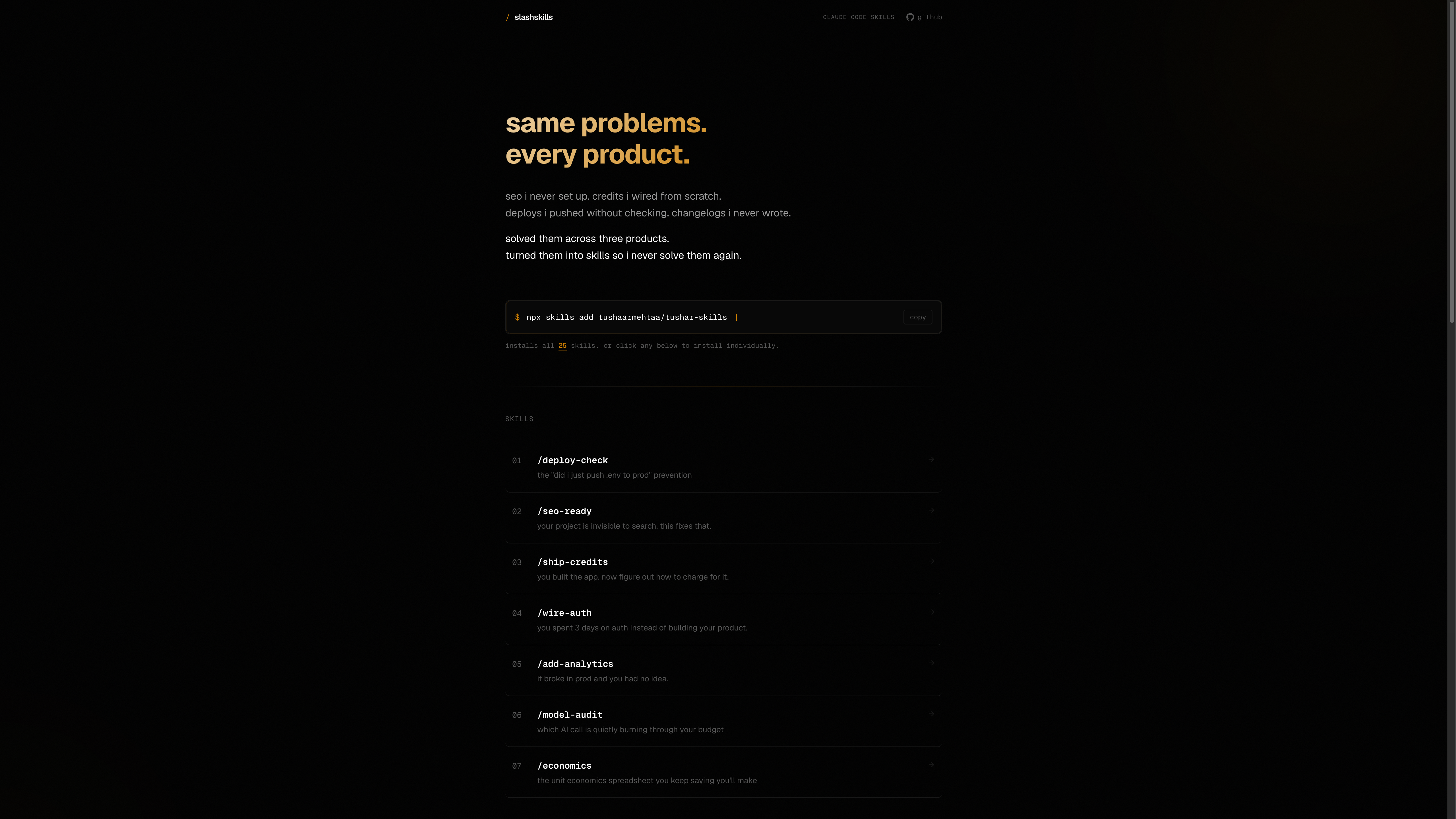
The file is allowed to change. If I keep fixing the same mistake, I improve the instruction or add a better example. If one new rule breaks other kinds of writing, I narrow it to the job where it belongs.
Build your first version
Pick one recurring task. Save a good example, a relevant source, and a brief. Draft it with AI, then edit it yourself. Keep a record of the changes you had to make.
On the next assignment, see which of those changes applies again. That is the beginning of the reusable process. Keep expanding it while you can still explain why each part is there.
Use the content brief, the starter skill, and the examples above. You should be able to finish with a workflow you can test on your own work.
Expanded from my content engineering session at AI & Weekends, Bengaluru, 10 May 2026. Screenshots preserve the original artifacts; practice edits and starter files were added for this guide. Technical references checked 5 September 2026.