Scriptwriting
Writing a short video, one decision at a time
Follow one complete script from research to final read, then compare openings, structures, and endings before trying the exercises.
In this guide · 15 sections
“Today I want to talk about a new AI tool.”
That sentence takes a few seconds to say and gives the viewer almost nothing. Which tool? What did it do? Why did you want to make a video about it?
I've written scripts for founders, tech channels, and brands. Often, the answer is already in the research. It just arrives after an introduction, a definition, and a paragraph of background nobody needed yet.
Let's work through a short video from the source material to the final line. You can follow along with an idea of your own. If you're here for the live session, open the workshop.
Find the idea and read a complete scriptResearch and explanation are separate skills
I learned this across founder content, Builders Central, Nothing's Death of PC, and podcast work. Research, writing, creative direction, and feedback from editors all feed into the script. The sentence is one part of that work.
The work library has the stories behind those projects. In the workshop, I also point to creators such as Cleo Abram, Johnny Harris, Derek Muller, and Dwarkesh Patel: different ways to make demanding subjects worth following.
The distinction I care about is between the quality of the research and the quality of the explanation. They can improve independently.
| Research | Hard to follow | Clear and well-paced |
|---|---|---|
| Substantial research | The work is there, but the audience may never reach it. | The audience can understand the finding and why it matters. |
| Thin research | Little to learn, with more effort required. | Easy to watch, but the explanation has little underneath it. |
Good writing can make weak research sound convincing. That's a reason to keep checking the source while editing. Good research can also disappear inside a script that spends too long getting started.
This guide focuses on 30–90 second videos. A longer video needs more room for context, chapters, and delayed payoffs. You can use the same questions about clarity, but don't force a long explanation into the same structure.
Find the thing you actually want to say
In February 2026, I wrote about getting Bangers Only to its first 100 users. Before that, authentication, cloud setup, and connecting external services had felt intimidating.
Building the product gave me reasons to learn those things. That is enough for a short video. The milestone makes the learning concrete; the fear of a large bill gives it a detail I recognise from my own experience.
Here's the brief for our example:
- Reader: someone who wants to build a small tool but feels underqualified.
- Idea: a project can give you a reason to learn the unfamiliar parts.
- Source facts: I built a tweet-writing tool, reached 100 users, and worked through setup I had been avoiding.
- Leave out: a tutorial on authentication, every tool in the stack, and a general argument about the future of software engineering.
The script and alternatives below are practice drafts based on that newsletter. They illustrate writing choices; they aren't a report of a published video's performance.
Put a person and a change in the idea
“I learned to build with AI” gives me a subject. “I wanted people to use my app, but I was avoiding the setup that would let them in” gives me a person with a problem. We have somewhere to go.
Use the details in your research: the task, the bill, the awkward decision, the thing someone tried twice. A detail earns its place when it helps the viewer understand what happened. Check numbers against the source; leave unknown ones out.
For our Bangers Only example, the 100-user milestone is useful because it connects the learning to an outcome. I don't need to inflate it. The interesting part is what I had to learn to reach it.
Read the whole script first
I got my little tweet-writing app to 100 users. Two months earlier, adding a login screen felt like a reason to keep the whole thing private.
I was worried about authentication, cloud setup, connecting external services. Every new account felt like one more way to break something or end up with a bill I couldn't afford.
But I wanted people to use the thing. So I had to work through the parts I'd been avoiding.
That's how I started learning what all of it actually did. Auth, databases, email, the bits around the product that I used to find boring. Now I had a reason to care.
I still had plenty to learn. Getting to 100 users didn't make me an engineer overnight. It gave me a product I could keep working on, and much more specific questions to ask.
If you've got a small idea, start there. See what it makes you learn.
Read it aloud once, then turn on the writing notes. Notice where you need a breath, where you want the next sentence, and where you'd change a word. The notes explain the choices, including what I would leave out.
Download the script and blank worksheet.
Work through the writing decisionsChoose what the opening promises
The opening decides which part of the story the viewer expects. Here are three ways into the same source material:
Start with the result: “I got my little tweet-writing app to 100 users. Two months earlier, adding a login screen felt like a reason to keep the whole thing private.”
Start with the worry: “I wanted people to use my app. I was also worried that connecting another service would leave me with a bill I couldn't afford.”
Start with the learning: “Building a tweet writer made me learn authentication, databases, and email. I finally had a reason to understand the setup I'd been avoiding.”
I'd choose the first for this version. It gives the story an outcome immediately, then introduces the obstacle. The next few lines can explain what happened between those two points.
The second could work for a more personal video about the fear of making something public. The third gets to the lesson quickly, but has less of a story to pull us through.
The useful comparison is what each version makes us wait for: an outcome, a decision, or an explanation. Choose the one you have enough material to finish.
Try eight ways into the same material
Most of these use the same Bangers Only experience. The big-name example uses an Airbnb post from my client work, so you can see where a different source calls for a different opening.
I got my little tweet-writing app to 100 users. Two months earlier, I was scared to make it public.
An outcome followed by an obstacle. The body needs to explain the distance between them.
Read all 8 hooks together
- Person + outcome
- I got my little tweet-writing app to 100 users. Two months earlier, I was scared to make it public.An outcome followed by an obstacle. The body needs to explain the distance between them.
- Big name + surprise
- Airbnb’s founders sold cereal boxes to keep the company going.A familiar company and an unfamiliar business. The next line needs to explain why cereal belongs in a story about Airbnb. This uses a different source from the Bangers Only openings.Published Karthik post from my client work
- Warning
- I was worried that connecting one more service to my app would leave me with a bill I couldn’t afford.The consequence is concrete: an unaffordable bill. “I was worried” keeps this in the narrator’s experience and sets up a story about working through the fear.
- Reframe
- The setup I kept putting off became interesting once I needed it for my own product.Changes the way we understand a familiar obstacle. Explain what made the difference.
- Hidden pattern
- Every unfamiliar part of the app gave me another reason to keep it private.Names a recurring behaviour in this story. The script should show how the pattern was interrupted.
- Live proof
- This is the tweet-writing app I built. Let me show you what I had to learn to put it online.Needs an actual demonstration. The footage should deliver the promise immediately.
- Precise number
- The first 100 users gave me much more specific questions about building software.The February milestone gives the lesson a scale. Follow it with the questions or work that became possible; otherwise the number is doing all the work.
- Recognition
- I wanted people to use my app. I also kept finding reasons it wasn’t ready to be public.Gives another beginner a situation they may recognise. Stay with that tension instead of jumping into a generic lesson.
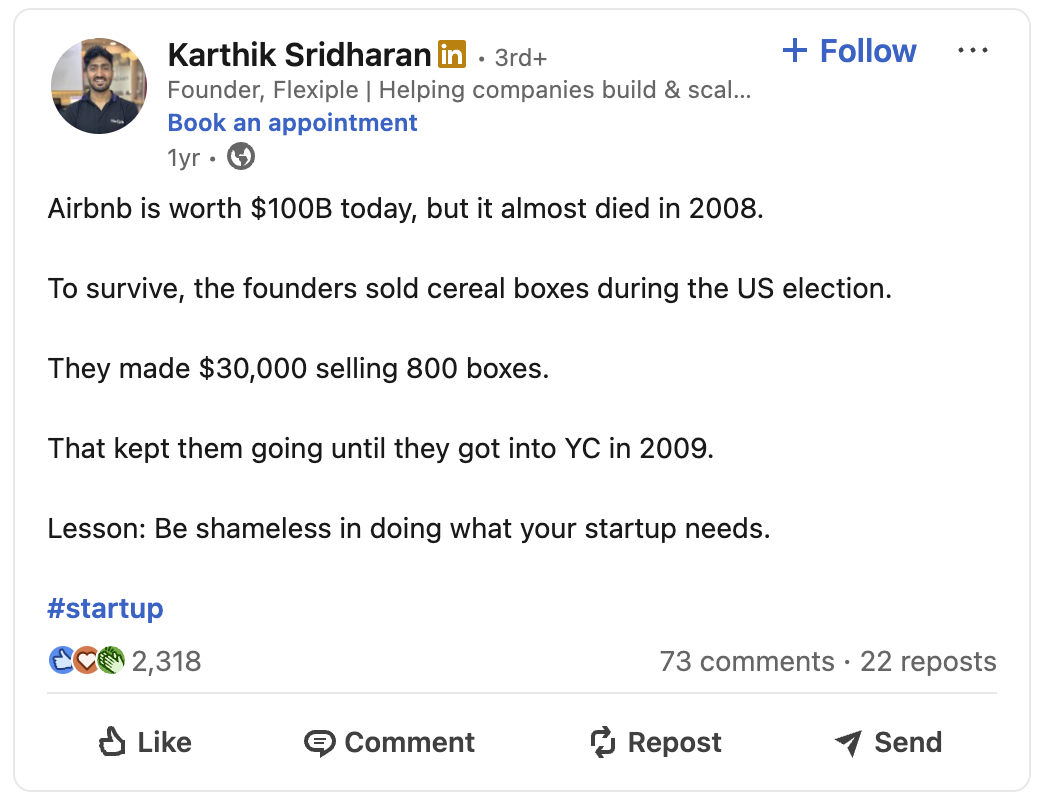
Practice openings from the February 2026 newsletter, plus an Airbnb example adapted from my published client work.
Notice how little the sentence needs to do. It gives us something specific to picture and a reason to continue. The Airbnb line makes us wonder why the founders were selling cereal. The Bangers Only line makes us wonder how I got past the setup.
Four checks before I keep an opening
- Can I say why someone would want the next sentence?
- Is there a person, detail, result, or question they can picture?
- Does the audience have enough context to understand it?
- Does the body answer what this opening sets up?
Compare openings against the same source material. Otherwise you can mistake a more sensational claim for a better-written hook. Read them aloud too; an opening can work on the page and sound awkward in your mouth.
Let the body answer the opening
The opening leaves a question: how did I get past the setup I was avoiding? The body needs to answer that before wandering into anything else.
The sequence here is simple: what worried me, why I had to face it, and what I learned by doing it. I don't need to fit it into a more elaborate structure.
Try removing “But I wanted people to use the thing.” The script still moves from being worried to learning the setup, but we lose the reason I did it. That short sentence carries more of the story than a paragraph about perseverance would.
Now try removing the fear of the bill. The sequence still works, but the worry becomes less personal. These are different kinds of cuts: one removes the reason for the action; the other removes a detail that makes it easier to recognise.
I'd cut a detour explaining what authentication is. That might make a useful second video, but this one is about how a real project changed my reason for learning it.
For another story, the sequence might be different. A demonstration can start with the result and work backwards. A researched explanation might need context first. Pick the order that makes the next thing understandable.
Use a body structure that suits the idea
I use six shapes in the workshop: discovery, list, take, story, problem and solution, and demonstration. Each gives me a way to organise the middle. I can change the order when the material calls for it.
I used to find auth, databases, and email boring. Then my own app needed them. Explain one part I learned, show where it sits in the product, and return to why it became interesting.
Discovery → explanation → changed understanding. Go deeper on one component; the source story needs a technical example before it can become this video.
Read all 6 shapes together
- Discovery
- I used to find auth, databases, and email boring. Then my own app needed them. Explain one part I learned, show where it sits in the product, and return to why it became interesting.Discovery → explanation → changed understanding. Go deeper on one component; the source story needs a technical example before it can become this video.
- List
- Three things building Bangers Only made me learn: authentication, databases, and email. Give each one a job inside the app, then show how they fit together.Promise → distinct items → useful pattern. The viewer expects three explanations. A story about overcoming fear would leave that promise unfinished.
- The take
- A small project can tell you what to learn next. Use the setup I had avoided, the need to let users in, and the work that followed to explain that view.Position → reasons → consequence. This version argues for an approach to learning. One experience can illustrate it; a universal claim would need more evidence.
- Story
- I wanted people to use Bangers Only. I was avoiding the setup that would let them in. Wanting a working product finally gave me a reason to learn it.Want → resistance → change. This is the complete practice script’s shape. The turning point is wanting users enough to work through the setup.
- Problem + solution
- Making the app public meant dealing with setup I had avoided. Pick one obstacle, show the actual steps I used to resolve it, and finish with that part working.Problem → attempt → result. To make this version, collect the missing implementation details. “I worked through it” is enough for the personal story, but too vague for a how-to.
- Show and tell
- Open Bangers Only and show a note becoming a draft. Walk through the inputs and the edit, then point out the choice that most changed the output.Result → demonstration → useful detail. Record the actual workflow. The screen can explain the interface while the voice explains the decisions.
Alternative outlines for the Bangers Only experience. Choosing a shape also changes what you need to research or record.
For our example, the story is a beginner who wants people to use his product but is avoiding the setup required to make that possible. Building forces a change in what he is willing to learn. That's the movement the script follows.
A list would make it a different video: the technical things I had to learn. A demonstration would need something the viewer could watch me do. Those are legitimate choices, but I would change the opening to match.
Keep the middle moving
An open loop gives the viewer something to wait for: an unanswered question, a result, an explanation. Close it when the story reaches that point. Delaying an ordinary answer for too long can feel like wasting the viewer's time.
Visual proof can replace a long description. A surprising observation can change the direction. A short sentence can create a pause. Use the device because the idea needs it, and notice when you start repeating it by habit.
In the workshop, I call this “the buy”: each line should give someone a reason to hear the next. It is an editing question; every sentence needn’t be a cliffhanger. Sometimes the reason is simply that the explanation is becoming clear.
Explain a difficult idea in three moves
Start with what the audience probably thinks. Show the correction or missing distinction. Then explain the consequence. This is especially useful when a term sounds more familiar than it really is.
For example: “The context window tells you how much material a model can handle in a request. It doesn't tell you which of your files are relevant. You still have to choose what belongs in the brief.”
Each sentence prepares the next. An analogy can help someone enter the subject, but eventually I need to explain what the thing actually does. Technical accuracy shouldn't disappear when the script gets simpler.
Budget time for the voice and the screen
Word count helps me estimate whether a script fits, then I record a rough read. If I pause over a screenshot, the viewer needs that time even when I am not speaking.
60 seconds speaking + 8 seconds held.
An adjustable planning example. Time your own read before deciding what to cut.
Add time for pauses and shots the viewer needs to read. Then record a rough take at a comfortable pace. If the explanation only fits when you rush, go back to the script.
If a script runs long, I first remove repeated setup, unnecessary definitions, and detours. Speeding up every sentence may make the runtime fit while making the explanation worse.
For a longer piece, I split the idea into sections with their own questions and payoffs. I don't treat a ten-minute video as ten short scripts attached to one another.
Decide what the viewer needs to see
A script for video also needs to account for the screen. If the visuals already explain something, the spoken line can move on.
For this example, I could show the app when I name it. If I show a user count, it needs to be the historical record for that milestone, with its date. A current dashboard wouldn't prove what happened in February.
During the setup section, a short view of the actual product would be more useful than a montage of unrelated terminals. I'd keep the screen simple enough that the viewer can still follow the sentence.
Mark missing footage before the editor starts. For this practice script, the historical milestone record is a useful asset if available; the person can tell the story on camera if it isn't.
Here's what a handoff for part of the practice script could look like:
| Spoken line | What to show | What the editor needs |
|---|---|---|
| “I got my little tweet-writing app to 100 users.” | The product, with a dated milestone record if available. | The real asset and its date. Use the talking shot if the record isn't available. |
| “I was worried about authentication…” | A simple view of the setup being discussed. | Enough context to understand the obstacle without a wall of code. |
| “But I wanted people to use the thing.” | Return to the person telling the story. | Leave room for the sentence; it is the reason the story moves. |
| “Now I had a reason to care.” | Hold the shot or show the relevant finished interaction. | Avoid adding several competing labels over the line. |
A source link, an asset name, and a clear note about timing save the editor from reverse-engineering what I meant. If a visual can't be sourced, I change the plan before it turns into a production problem.
Cut the lines you wouldn't say
Here's a deliberately clumsy version of the same part of the story:
Throughout the process of building my application, I developed a greater understanding of the various technical components required to bring a product to users.
It's grammatical. It also sounds nothing like how I'd tell a friend what happened.
The final version names the things I learned, then adds why I cared: “Auth, databases, email, the bits around the product that I used to find boring. Now I had a reason to care.”
That edit replaces a general account of progress with the actual work. It also gives me places to pause while speaking.
When I read aloud, I listen for sentences that need a second attempt. Sometimes a word is awkward. Sometimes the sentence contains two ideas that need their own space. Sometimes I'm explaining the previous line again.
I also check the dramatic lines. If every sentence announces a revelation, the script gets tiring. A straightforward explanation gives the important moment somewhere to land.
End where the idea is complete
The ending here is a small invitation: pick a project and see what it makes you learn. That's an action someone can connect to the story they just heard.
I could end a demonstration by showing the finished result. I could end an argument with the consequence of the evidence. If a resource helps someone take the next step, I can offer it.
The choice depends on what the video is for. I don't need to ask for a comment just because the previous video did.
Compare seven possible endings
The original workshop includes seven ways to finish. They solve different problems. Choose the one that belongs to this video's purpose and to what the viewer has just learned.
That little app reached its first 100 users.
Finish on the outcome when the preceding story gives it enough meaning.
Read all 7 endings together
- Let the fact land
- That little app reached its first 100 users.Finish on the outcome when the preceding story gives it enough meaning.
- Ask a question
- What part of your project have you been putting off learning?Invites a relevant response. It should be a question you are interested in hearing answered.
- Return to the opening
- The login screen I was avoiding became one of the things I finally had a reason to understand.Closes the loop by returning to the original obstacle with a changed understanding.
- Give a next step
- If you’ve got a small idea, start there. See what it makes you learn.The ending used in the complete practice script. The action follows from the experience.
- Offer a resource
- I’ve linked the notes and the source story below.Give the viewer a useful continuation. In this guide, the worksheet keeps the source notes, draft, and production plan together.The script and worksheet
- Make a prediction
- I expect the next project to send me back to the documentation. But I’ll have a better idea of what to look for.A possible ending for a version about what comes next. The forecast follows from having more specific questions; the body would need to establish that connection.
- End on their words
- “I got 100 users to my app, and I couldn’t be happier with the progress so far.”An exact line from my February newsletter. In a narrated profile, you could end with the subject’s own reaction. In my first-person version, the invitation to try a project fits better.Source newsletter · 15 February 2026
Practice endings, with one direct quotation from the source newsletter. Choose the ending that fits the video you actually made.
A request to comment can make sense when I have a question worth discussing. An offered resource should help with the next step. A prediction needs reasons. The ending is allowed to be quiet when the final fact is enough.
For the Bangers Only example, I kept a small invitation to try a project. A sales pitch would change the purpose of the piece. A long summary would repeat a lesson the viewer has already heard.
Build your own writing processWrite down the edits you want to repeat
Voice comes from choices: the detail I notice, the words I use, how much I explain, and where I stop. “Make it human” doesn't identify any of those choices.
| Vague feedback | A note someone can use |
|---|---|
| Make it punchier. | Start at the decision; move this background sentence below it. |
| Add personality. | Keep the exact thing I noticed when I tried it. |
| Make it less AI. | Cut the sentence that announces a lesson before giving the example. |
| Improve the flow. | The viewer doesn't know what this pronoun refers to yet. Name it. |
| Make it more engaging. | Show the outcome before explaining the process. |
Collect examples you like and explain the useful choice. Keep before-and-after edits. Add the structures you return to and the questions you ask before publishing. That becomes a working reference you can share with a writer or a model.
The content engineering guide shows how I package that material into instructions and reference files.
Use AI inside the writing process
I use it to explore openings, compare structures, identify repetition, and prepare production notes. The useful input is a source and a specific job. “Write a viral video” doesn't tell it what the video should say.
Use the source notes below to propose three openings.
Keep the same facts in every version.
For each opening, explain:
- what the viewer expects next;
- what the body needs to deliver;
- whether the source material is sufficient.
Flag missing information instead of filling it in.
Once I choose an angle, I can ask for a draft or a review against the brief. If I don't know whether a claim is true, I go back to the source. A confident rewrite doesn't settle that question.
- 01Research + angle
Gather facts and choose what to say.
- 02Write + read
Try openings, draft, and read aloud.
- 03Produce
Source visuals, brief the editor, and record.
- 04Review
Watch the delivery and keep useful feedback.
Thumbnail, caption, and distribution belong in the publishing handoff too. Repeated edits become reference material.
The publishing step matters because the recording reveals things the document can't: delivery, visual timing, and where a pause feels too long. Feedback should come back into the next brief and the reference set.
Try it with your own material
Pick a subject you can support with research or experience. Write the source facts down before writing the script. This helps you notice when a catchy sentence has gone beyond what you know.
Then work through these steps:
- Write the idea in one sentence. Name the person or situation when it helps.
- Try three openings from different angles. Say what each one promises.
- Choose an opening you can deliver on, then draft the body.
- Mark what the viewer should see. Cut any explanation the visual already handles.
- Write an ending that fits the purpose. Read the whole script aloud and time it.
- Ask someone where they got confused or stopped caring. Get them to point to a line.
AI can help you generate options or check a draft against the brief. Give it the source facts and tell it to flag gaps. Keep the choice of angle, the factual check, and the final read with you.
The workshop gives these tasks their own writing time. You can follow the same sequence on your own:
| Exercise | What to finish | How to review it |
|---|---|---|
| 1. Topic | One sentence naming the idea. | Can someone tell what this video is about? |
| 2. Openings | Five different approaches; choose one. | Which promise can the source material deliver? |
| 3. Body | A draft using a suitable shape. | Where does the explanation wander or repeat? |
| 4. Endings | Three alternatives; choose one. | Does it finish the idea and fit the purpose? |
| 5. Read aloud | A timed recording or spoken read. | Mark the words you stumble over or wouldn't use. |
| 6. Peer review | One specific note from another person. | Ask them to point to the confusing or uninteresting line. |
You can use the interactive workshop for the examples and timers, and the worksheet to keep your source notes beside the draft.
Once you've recorded it, you have something a draft can't give you: the actual delivery. Watch where you rush, where you sound like you're reading, and where the idea becomes clear. Start the next edit there.
This guide accompanies Script Writing 101, my 60- or 90-minute workshop. The live session includes more examples and time to write, read aloud, and exchange feedback.